



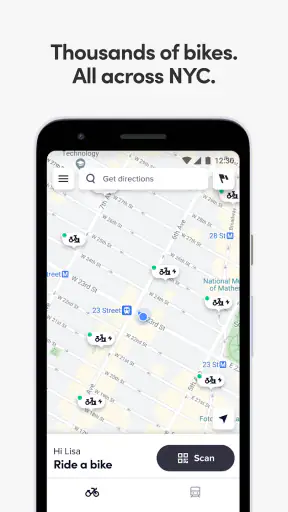
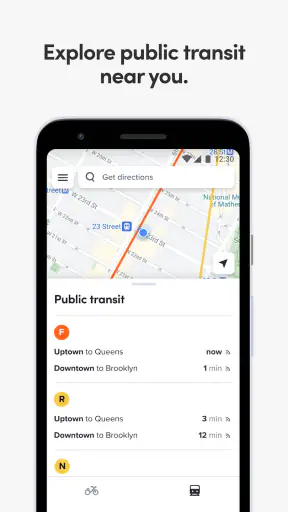
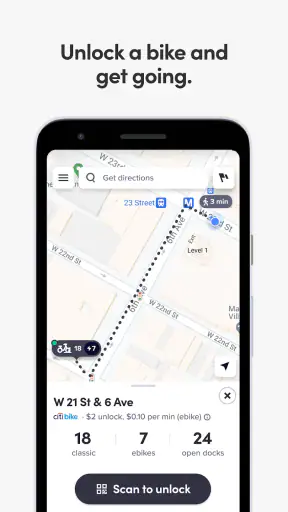
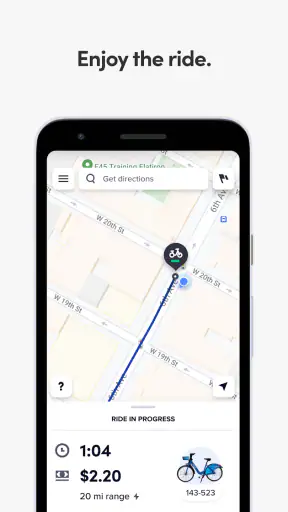
I found Citi Bike most useful when I treated it as a practical city-ride companion rather than a complete replacement for every map or transport app. It belongs to Maps & Navigation, is free to use, and comes from Lyft, Inc. Its purpose is straightforward: help people understand the city bike system before and during a trip. That focus can make a short ride feel much less uncertain, especially when I am trying to decide whether cycling is realistic for the next part of a journey.
My review centers on something that is easy to overlook with a bike-sharing app: how clearly it supports people with different abilities, different levels of cycling confidence, and different surroundings. A visitor checking a station near a hotel has different needs from a daily commuter, while someone with limited hearing, reduced vision, balance concerns, or a mobility limitation may need to evaluate the app and the physical bike network together. The app can help with planning, but it cannot remove every barrier created by traffic, weather, station design, or the condition of a bicycle.
How clearly the app helps me read and plan a ride
The biggest strength of Citi Bike is that it keeps the main question in view: can I find and use a shared bike for this trip? I do not need to begin with a broad transport search when my intention is specifically to cycle. That narrower purpose makes the experience easier to understand than opening a general navigation tool and sorting through walking, driving, public transport, and cycling options at once.
For a first-time visitor, that focus is valuable. I can think about the route in stages: where I am starting, where a bike may be available, and where I need to finish. This is a better mental model than simply asking for directions to an address, because bike sharing depends on access points as well as roads. A destination may be close on the map yet inconvenient if I cannot finish near a suitable station.
I also appreciate that the app’s identity is clear from the moment I consider installing it. The store presents Citi Bike as a co-pilot for city biking, and the short description is simply “Citi Bike.” That is not a detailed explanation, but it avoids pretending to be a general-purpose navigation suite. The product is aimed at a specific task, and I think that honesty helps set the right expectation.
In everyday use, readable navigation is not only about text size or visual contrast. It is also about reducing the number of decisions I must make while standing on a pavement, carrying a bag, or trying to leave a busy building. A focused bike app can reduce mental clutter because I am not searching through unrelated transport choices. Still, I would not rely on it alone for every detail of a complex journey. I would check the wider route separately when crossings, steep streets, protected lanes, or a difficult final approach matter.
Why the focused design helps some users more than others
People who already understand bike sharing will probably move through the app quickly. For a newcomer, the important habit is to plan the return as carefully as the departure. A bike can solve the first part of a trip while creating a problem at the destination if the final location does not work for a return or handoff. I recommend deciding where the ride should end before unlocking anything, especially when arriving for an appointment or event.
This is one of the less obvious trade-offs of a dedicated service. A general map may be better at combining several transport modes into one continuous journey, while Citi Bike is more useful when the bike portion deserves its own attention. I would use the dedicated app to understand the bike system and another navigation tool when I need detailed door-to-door guidance.
The app has a strong public signal behind it. It holds a 4.6 average from around 6.7 thousand ratings and has passed one million installs. Those figures suggest that many people find the focused approach useful, although they do not tell me whether the experience suits every neighborhood, device, or physical ability. The important point is that popularity should encourage a trial, not replace personal checking.
Readability in motion and under pressure
Using any phone while cycling is a poor idea, regardless of how clear the interface may be. I would review the plan before setting off, then stop somewhere safe if I need to look again. This matters particularly for riders who need more time to interpret a map, who experience visual fatigue, or who become disoriented in busy streets. A readable screen is helpful, but it does not make roadside phone use safe.
For riders with limited vision, the practical question is whether the app’s information can be enlarged or interpreted comfortably through the device’s own settings. I would test that at home rather than waiting beside a station. A person who depends on a screen reader, magnification, or stronger contrast should also confirm that the essential station and trip information remains understandable with those settings enabled. I cannot treat the app as automatically accessible simply because it is simple.
There is a useful planning trick here: take a screenshot or write down the key destination before leaving, but do not assume a static image will reflect changing bike availability. That approach can reduce screen time for someone who finds live map reading tiring, while a quick check immediately before unlocking can catch an important change. It is a small compromise between independence and current information.
How it fits different bodies, senses, and situations
Motor considerations before unlocking
Shared cycling is not equally comfortable for every body. Someone with limited hand strength, joint pain, reduced balance, or difficulty mounting a bicycle may find the physical vehicle more challenging than the app itself. Citi Bike can support the planning side of the decision, but it cannot guarantee that a particular bike will be easy to handle. I would not interpret a nearby station as proof that the available bicycle will suit me.
My practical advice is to build in a pause before starting. Check whether the chosen bike appears usable, whether the route allows enough room to stop, and whether the destination is realistic without rushing. A rider who needs extra time to mount, adjust position, or regain balance should avoid making the trip depend on a tight arrival window. The app may make access more visible, but the street environment determines whether the ride feels manageable.
This is also where cycling confidence matters. A strong rider may see a short urban trip as simple, while a beginner may need a quieter route, more stopping opportunities, and a destination that does not require weaving through a crowded plaza. I would use the app to identify the bike part of the journey, then judge the physical route according to my own comfort rather than the distance alone.
For people who cannot comfortably cycle, the app may still be useful for evaluating whether a companion can use a bike while they choose another mode. That is a subtle but worthwhile role. It can help a group discuss the transport plan without assuming everyone must travel in the same way. In that situation, a general journey planner may be better for the non-cyclist, while Citi Bike remains useful for the person riding.
Sensory needs and environmental noise
Busy streets create sensory challenges that no app can fully solve. Traffic noise, crowds, glare, rain, and construction can make it difficult to hear alerts, read a screen, or concentrate on a route. Someone who is sensitive to noise may prefer to prepare indoors and use the app only for a brief confirmation outside. Someone who relies on visual information should avoid assuming that an audible cue will be enough in a loud environment.
I would also separate the app’s clarity from the city’s clarity. A clean station view cannot make a confusing intersection easier to cross, and a clear destination cannot warn me about every unexpected obstruction. Riders with hearing differences may need to pay particular attention to visual surroundings, while riders with visual differences may need a companion or a route they already know. These are not failures unique to this product; they are limits of placing digital guidance inside a demanding physical setting.
One useful workflow is to plan in a quiet place, identify the start and end points, and decide in advance where I will stop if I become overloaded or uncertain. That makes the phone a preparation tool rather than something I must constantly interpret while moving. I find this especially helpful on unfamiliar trips, where the stress comes less from distance than from making several small decisions in public.
Situational access for visitors, commuters, and occasional riders
Citi Bike makes the most sense for people who want a city bicycle without committing to ownership. It can suit a visitor who wants to cover more ground than walking allows, a commuter filling a gap between transport connections, or an occasional rider making a short local trip. Its free price also lowers the barrier to trying the app itself, although the practical cost of using a bike-sharing service should still be considered separately from downloading the application.
For a visitor, I would use it as part of a simple sequence: learn the area, identify a plausible starting point, check the destination plan, and only then decide whether cycling fits the day. This avoids the common mistake of treating a station as a guaranteed solution for an entire itinerary. A tourist carrying luggage, wearing unsuitable clothing, or traveling with someone who cannot cycle may find walking or public transport more predictable.
For a commuter, the app can be valuable when the usual route changes. A delayed train, a crowded bus, or a meeting in a different part of the city may make a bike attractive. The trade-off is that cycling introduces physical effort and exposure to weather. I would not choose it merely because the map shows a short distance; I would consider how I will feel on arrival and whether I can safely manage the return journey.
For an occasional rider, the main advantage is reduced commitment. I do not need to own, store, or maintain a bicycle to consider a ride. The main friction is that unfamiliar users may still need time to understand the complete process around locating, taking, and finishing a trip. I would avoid testing the service for the first time immediately before an important appointment. A relaxed trial gives me room to learn the workflow without turning a small uncertainty into a missed deadline.
Where the usual alternatives are better
Google Maps, Apple Maps, and similar general navigation tools are usually better when I need one route combining walking, trains, buses, and cycling. They are also more natural when my destination is a specific building entrance rather than a bike station. A dedicated Citi Bike experience wins when the bike-sharing decision is the central problem and I want less unrelated information competing for attention.
Walking is often better for very short distances, for people carrying fragile items, or for anyone who does not feel secure cycling in traffic. Public transport is generally the safer choice when weather is poor, fatigue is high, or the route involves roads that feel intimidating. Owning or renting a conventional bicycle may suit someone who needs a particular frame, saddle, pedal arrangement, or riding position that a shared fleet cannot guarantee.
That comparison is important because the app’s usefulness depends on the physical match between rider and trip. I would recommend it enthusiastically to someone who wants a focused way to explore city bike sharing. I would not recommend making it the only transport plan for a person whose mobility needs require a specific adapted cycle or who cannot comfortably transfer onto a standard shared bicycle.
Remaining barriers I would plan around
The first barrier is the gap between digital availability and physical suitability. Seeing a bike option does not tell me whether the bicycle will be comfortable, whether the surrounding pavement will be clear, or whether I can safely leave at the destination. The second is the gap between a mapped route and a usable route. A line on a screen does not capture every curb, crowd, road surface, or stressful junction.
Another barrier is time pressure. A rider who can manage a trip comfortably with preparation may struggle if a station is busy, a bike needs checking, or the final approach is confusing. I would leave extra time whenever accessibility, balance, vision, hearing, or anxiety affects how quickly I can make decisions. This is not wasted time; it is part of making the journey dependable.
Device compatibility also deserves a quiet check. The app supports a minimum operating system of version 9, and its current version is 2026.32.3.1787124423. I would update the app before an important trip and test it on the phone I actually plan to carry. Keeping the software current can prevent avoidable surprises, but an update cannot solve a physical access issue or guarantee that every assistive setting will behave exactly as I expect.
The age rating is Everyone, which makes the app broadly suitable from a content perspective. That should not be confused with universal physical suitability. A child, older adult, or person with a disability may still need supervision, a companion, a different route, or another transport option depending on the journey. The app is inclusive in its potential audience, but the real experience depends heavily on the rider and the city around them.
Small habits that make the experience more inclusive
I would start by planning the end first. If the destination is crowded, hilly, unfamiliar, or difficult to approach, I would identify a nearby place where I can safely stop and continue on foot. This is more useful than choosing a bike solely because the starting station is convenient. It also helps riders who need a predictable transition from cycling to walking.
Next, I would prepare an alternative before unlocking. That could mean knowing the nearest walking route, having a transport option in mind, or agreeing on a meeting point with a companion. If the physical bike, weather, traffic, or sensory environment feels wrong, I can change plans without feeling trapped by the first decision. This backup habit is particularly important for occasional riders and anyone whose energy or symptoms vary from day to day.
Finally, I would avoid judging the app only by how quickly I can find a station. The better test is whether it lets me make a calm, informed decision. If I can understand the bike portion, explain the plan to a companion, and abandon the ride safely when conditions are unsuitable, then it is doing something genuinely useful even when I ultimately choose to walk or take public transport.
My inclusive verdict after using it as a city-ride tool
Citi Bike is a focused, approachable choice for people who want to explore or cross a city by shared bicycle. I like that it concentrates on a real transport need instead of trying to become every kind of map at once. The free app, Everyone content rating, and established presence make it easy to consider, while the strong average rating and more than one million installs show that it has reached a substantial audience.
My recommendation comes with an important qualification: I would treat it as a planning and access aid, not as a promise that every ride will be physically accessible. It can help me think through stations, timing, and the bike portion of a journey, but it cannot guarantee a suitable bicycle, a comfortable route, or a stress-free environment. Riders with sensory, motor, or mobility needs should test their own workflow and keep a second option ready.
For a confident cyclist, visitor, or commuter who wants a dedicated way to approach city bike sharing, I think it is worth installing. For someone who needs door-to-door multi-modal directions, a specialized adaptive cycle, or the predictability of walking and public transport, another tool or another mode may be better. My final view is positive because the app can support more independent decisions when I use it thoughtfully, especially when I plan for the physical realities beyond the screen.


